opendataloader-project/opendataloader-pdf
OpenDataLoader PDF
PDF Parser for AI-ready data. Automate PDF accessibility. Open-source.





🔍 PDF parser for AI data extraction — Extract Markdown, JSON (with bounding boxes), and HTML from any PDF. #1 in benchmarks (0.90 overall). Deterministic local mode + AI hybrid mode for complex pages.
- How accurate is it? — #1 in benchmarks: 0.90 overall, 0.93 table accuracy across 200 real-world PDFs including multi-column and scientific papers. Deterministic local mode + AI hybrid mode for complex pages (benchmarks)
- Scanned PDFs and OCR? — Yes. Built-in OCR (80+ languages) in hybrid mode. Works with poor-quality scans at 300 DPI+ (hybrid mode)
- Tables, formulas, images, charts? — Yes. Complex/borderless tables, LaTeX formulas, and AI-generated picture/chart descriptions all via hybrid mode (hybrid mode)
- How do I use this for RAG? —
pip install opendataloader-pdf, convert in 3 lines. Outputs structured Markdown for chunking, JSON with bounding boxes for source citations, and HTML. LangChain integration available. Python, Node.js, Java SDKs (quick start | LangChain)
♿ PDF accessibility automation — The same layout analysis engine also powers auto-tagging. First open-source tool to generate Tagged PDFs end-to-end (coming Q2 2026).
- What’s the problem? — Accessibility regulations are now enforced worldwide. Manual PDF remediation costs $50–200 per document and doesn’t scale (regulations)
- What’s free? — Layout analysis + auto-tagging (Q2 2026, Apache 2.0). Untagged PDF in → Tagged PDF out. No proprietary SDK dependency (auto-tagging preview)
- What about PDF/UA compliance? — Converting Tagged PDF to PDF/UA-1 or PDF/UA-2 is an enterprise add-on. Auto-tagging generates the Tagged PDF; PDF/UA export is the final step (pipeline)
- Why trust this? — Built in collaboration with PDF Association and Dual Lab (veraPDF developers). Auto-tagging follows the Well-Tagged PDF specification, validated with veraPDF (collaboration)
Get Started in 30 Seconds
Requires: Java 11+ and Python 3.10+ (Node.js | Java also available)
Before you start: run
java -version. If not found, install JDK 11+ from Adoptium.
|
|
|
|
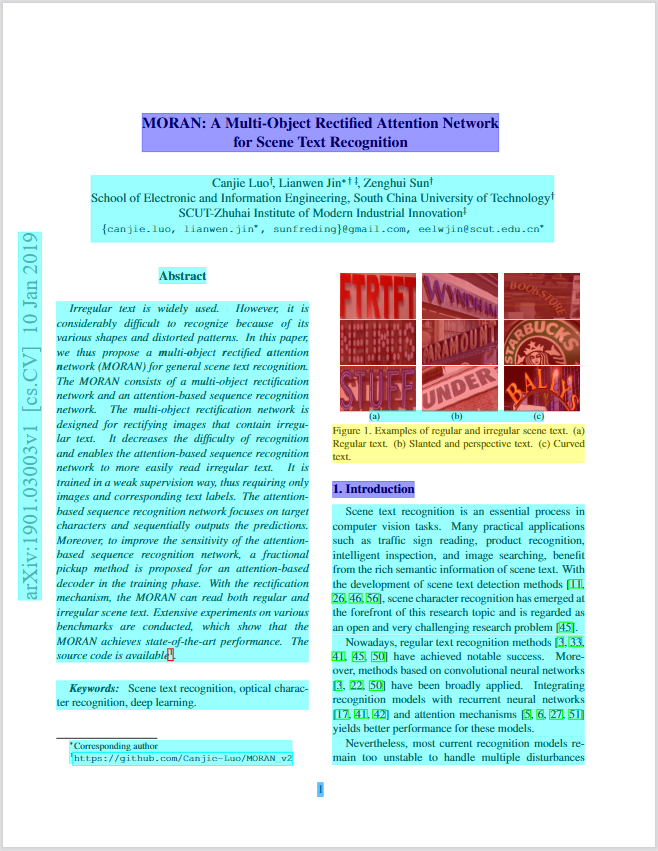
Annotated PDF output — each element (heading, paragraph, table, image) detected with bounding boxes and semantic type.
What Problems Does This Solve?
| Problem | Solution | Status |
|---|---|---|
| PDF structure lost during parsing — wrong reading order, broken tables, no element coordinates | Deterministic local PDF to Markdown/JSON with bounding boxes, XY-Cut++ reading order | Shipped |
| Complex tables, scanned PDFs, formulas, charts need AI-level understanding | Hybrid mode routes complex pages to AI backend (#1 in benchmarks) | Shipped |
| PDF accessibility compliance — EAA, ADA, Section 508 enforced. Manual remediation $50–200/doc | Auto-tagging: layout analysis → Tagged PDF (free, Q2 2026). Built with PDF Association & veraPDF validation. PDF/UA export (enterprise add-on) | Auto-tag: Q2 2026 |
Capability Matrix
| Capability | Supported | Tier |
|---|---|---|
| Data extraction | ||
| Extract text with correct reading order | Yes | Free |
| Bounding boxes for every element | Yes | Free |
| Table extraction (simple borders) | Yes | Free |
| Table extraction (complex/borderless) | Yes | Free (Hybrid) |
| Heading hierarchy detection | Yes | Free |
| List detection (numbered, bulleted, nested) | Yes | Free |
| Image extraction with coordinates | Yes | Free |
| AI chart/image description | Yes | Free (Hybrid) |
| OCR for scanned PDFs | Yes | Free (Hybrid) |
| Formula extraction (LaTeX) | Yes | Free (Hybrid) |
| Tagged PDF structure extraction | Yes | Free |
| AI safety (prompt injection filtering) | Yes | Free |
| Header/footer/watermark filtering | Yes | Free |
| Accessibility | ||
| Auto-tagging → Tagged PDF for untagged PDFs | Coming Q2 2026 | Free (Apache 2.0) |
| PDF/UA-1, PDF/UA-2 export | 💼 Available | Enterprise |
| Accessibility studio (visual editor) | 💼 Available | Enterprise |
| Limitations | ||
| Process Word/Excel/PPT | No | — |
| GPU required | No | — |
Extraction Benchmarks
opendataloader-pdf [hybrid] ranks #1 overall (0.90) across reading order, table, and heading extraction accuracy.
| Engine | Overall | Reading Order | Table | Heading | Speed (s/page) |
|---|---|---|---|---|---|
| opendataloader [hybrid] | 0.90 | 0.94 | 0.93 | 0.83 | 0.43 |
| opendataloader | 0.72 | 0.91 | 0.49 | 0.76 | 0.05 |
| docling | 0.86 | 0.90 | 0.89 | 0.80 | 0.73 |
| marker | 0.83 | 0.89 | 0.81 | 0.80 | 53.93 |
| mineru | 0.82 | 0.86 | 0.87 | 0.74 | 5.96 |
| pymupdf4llm | 0.57 | 0.89 | 0.40 | 0.41 | 0.09 |
| markitdown | 0.29 | 0.88 | 0.00 | 0.00 | 0.04 |
Scores normalized to [0, 1]. Higher is better for accuracy; lower is better for speed. Bold = best. Full benchmark details

Which Mode Should I Use?
| Your Document | Mode | Install | Server Command | Client Command |
|---|---|---|---|---|
| Standard digital PDF | Fast (default) | pip install opendataloader-pdf |
None needed | opendataloader-pdf file1.pdf file2.pdf folder/ |
| Complex or nested tables | Hybrid | pip install "opendataloader-pdf[hybrid]" |
opendataloader-pdf-hybrid --port 5002 |
opendataloader-pdf --hybrid docling-fast file1.pdf file2.pdf folder/ |
| Scanned / image-based PDF | Hybrid + OCR | pip install "opendataloader-pdf[hybrid]" |
opendataloader-pdf-hybrid --port 5002 --force-ocr |
opendataloader-pdf --hybrid docling-fast file1.pdf file2.pdf folder/ |
| Non-English scanned PDF | Hybrid + OCR | pip install "opendataloader-pdf[hybrid]" |
opendataloader-pdf-hybrid --port 5002 --force-ocr --ocr-lang "ko,en" |
opendataloader-pdf --hybrid docling-fast file1.pdf file2.pdf folder/ |
| Mathematical formulas | Hybrid + formula | pip install "opendataloader-pdf[hybrid]" |
opendataloader-pdf-hybrid --enrich-formula |
opendataloader-pdf --hybrid docling-fast --hybrid-mode full file1.pdf file2.pdf folder/ |
| Charts needing description | Hybrid + picture | pip install "opendataloader-pdf[hybrid]" |
opendataloader-pdf-hybrid --enrich-picture-description |
opendataloader-pdf --hybrid docling-fast --hybrid-mode full file1.pdf file2.pdf folder/ |
| Untagged PDFs needing accessibility | Auto-tagging → Tagged PDF | Coming Q2 2026 | — | — |
Quick Start
Python
|
|
|
|
Node.js
|
|
|
|
Java
|
|
Python Quick Start | Node.js Quick Start | Java Quick Start
Hybrid Mode: #1 Accuracy for Complex PDFs
Hybrid mode combines fast local Java processing with AI backends. Simple pages stay local (0.05s); complex pages route to AI for +90% table accuracy.
|
|
Terminal 1 — Start the backend server:
|
|
Terminal 2 — Process PDFs:
|
|
Python:
|
|
OCR for Scanned PDFs
Start the backend with --force-ocr for image-based PDFs with no selectable text:
|
|
For non-English documents, specify the language:
|
|
Supported languages: en, ko, ja, ch_sim, ch_tra, de, fr, ar, and more.
Formula Extraction (LaTeX)
Extract mathematical formulas as LaTeX from scientific PDFs:
|
|
Output in JSON:
|
|
Note: Formula and picture description enrichments require
--hybrid-mode fullon the client side.
Chart & Image Description
Generate AI descriptions for charts and images — useful for RAG search and accessibility alt text:
|
|
Output in JSON:
|
|
Uses SmolVLM (256M), a lightweight vision model. Custom prompts supported via
--picture-description-prompt.
Hancom Data Loader Integration — Coming Soon
Enterprise-grade AI document analysis via Hancom Data Loader — customer-customized models trained on your domain-specific documents. 30+ element types (tables, charts, formulas, captions, footnotes, etc.), VLM-based image/chart understanding, complex table extraction (merged cells, nested tables), SLA-backed OCR for scanned documents, and native HWP/HWPX support. Supports PDF, DOCX, XLSX, PPTX, HWP, PNG, JPG. Live demo
Output Formats
| Format | Use Case |
|---|---|
| JSON | Structured data with bounding boxes, semantic types |
| Markdown | Clean text for LLM context, RAG chunks |
| HTML | Web display with styling |
| Annotated PDF | Visual debugging — see detected structures (sample) |
| Text | Plain text extraction |
Combine formats: format="json,markdown"
JSON Output Example
|
|
| Field | Description |
|---|---|
type |
Element type: heading, paragraph, table, list, image, caption, formula |
id |
Unique identifier for cross-referencing |
page number |
1-indexed page reference |
bounding box |
[left, bottom, right, top] in PDF points (72pt = 1 inch) |
heading level |
Heading depth (1+) |
content |
Extracted text |
Advanced Features
Tagged PDF Support
When a PDF has structure tags, OpenDataLoader extracts the exact layout the author intended — no guessing, no heuristics. Headings, lists, tables, and reading order are preserved from the source.
|
|
Most PDF parsers ignore structure tags entirely. Learn more
AI Safety: Prompt Injection Protection
PDFs can contain hidden prompt injection attacks. OpenDataLoader automatically filters:
- Hidden text (transparent, zero-size fonts)
- Off-page content
- Suspicious invisible layers
To sanitize sensitive data (emails, URLs, phone numbers → placeholders), enable it explicitly:
|
|
LangChain Integration
|
|
|
|
LangChain Docs | GitHub | PyPI
Advanced Options
|
|
PDF Accessibility & PDF/UA Conversion
Problem: Millions of existing PDFs lack structure tags, failing accessibility regulations (EAA, ADA/Section 508, Korea Digital Inclusion Act). Manual remediation costs $50–200 per document and doesn’t scale.
OpenDataLoader’s approach: Built in collaboration with PDF Association and Dual Lab (developers of veraPDF, the industry-reference open-source PDF/A and PDF/UA validator). Auto-tagging follows the Well-Tagged PDF specification and is validated programmatically using veraPDF — automated conformance checks against PDF accessibility standards, not manual review. No existing open-source tool generates Tagged PDFs end-to-end — most rely on proprietary SDKs for the tag-writing step. OpenDataLoader does it all under Apache 2.0. (collaboration details)
| Regulation | Deadline | Requirement |
|---|---|---|
| European Accessibility Act (EAA) | June 28, 2025 | Accessible digital products across the EU |
| ADA & Section 508 | In effect | U.S. federal agencies and public accommodations |
| Digital Inclusion Act | In effect | South Korea digital service accessibility |
Standards & Validation
| Aspect | Detail |
|---|---|
| Specification | Well-Tagged PDF by PDF Association |
| Validation | veraPDF — industry-reference open-source PDF/A & PDF/UA validator |
| Collaboration | PDF Association + Dual Lab (veraPDF developers) co-develop tagging and validation |
| License | Auto-tagging → Tagged PDF: Apache 2.0 (free). PDF/UA export: Enterprise |
Accessibility Pipeline
| Step | Feature | Status | Tier |
|---|---|---|---|
| 1. Audit | Read existing PDF tags, detect untagged PDFs | Shipped | Free |
| 2. Auto-tag → Tagged PDF | Generate structure tags for untagged PDFs | Coming Q2 2026 | Free (Apache 2.0) |
| 3. Export PDF/UA | Convert to PDF/UA-1 or PDF/UA-2 compliant files | 💼 Available | Enterprise |
| 4. Visual editing | Accessibility studio — review and fix tags | 💼 Available | Enterprise |
💼 Enterprise features are available on request. Contact us to get started.
Auto-Tagging Preview (Coming Q2 2026)
|
|
End-to-End Compliance Workflow
|
|
Roadmap
| Feature | Timeline | Tier |
|---|---|---|
| Auto-tagging → Tagged PDF — Generate Tagged PDFs from untagged PDFs | Q2 2026 | Free |
| Hancom Data Loader — Enterprise AI document analysis, customer-customized models, VLM-based chart/image understanding, production-grade OCR | Q2-Q3 2026 | Free |
| Structure validation — Verify PDF tag trees | Q2 2026 | Planned |
Frequently Asked Questions
What is the best PDF parser for RAG?
For RAG pipelines, you need a parser that preserves document structure, maintains correct reading order, and provides element coordinates for citations. OpenDataLoader is designed specifically for this — it outputs structured JSON with bounding boxes, handles multi-column layouts with XY-Cut++, and runs locally without GPU. In hybrid mode, it ranks #1 overall (0.90) in benchmarks.
What is the best open-source PDF parser?
OpenDataLoader PDF is the only open-source parser that combines: rule-based deterministic extraction (no GPU), bounding boxes for every element, XY-Cut++ reading order, built-in AI safety filters, native Tagged PDF support, and hybrid AI mode for complex documents. It ranks #1 in overall accuracy (0.90) while running locally on CPU.
How do I extract tables from PDF for LLM?
OpenDataLoader detects tables using border analysis and text clustering, preserving row/column structure. For complex tables, enable hybrid mode for +90% accuracy improvement (0.49 to 0.93 TEDS score):
|
|
How does it compare to docling, marker, or pymupdf4llm?
OpenDataLoader [hybrid] ranks #1 overall (0.90) across reading order, table, and heading accuracy. Key differences: docling (0.86) is strong but lacks bounding boxes and AI safety filters. marker (0.83) requires GPU and is 100x slower (53.93s/page). pymupdf4llm (0.57) is fast but has poor table (0.40) and heading (0.41) accuracy. OpenDataLoader is the only parser that combines deterministic local extraction, bounding boxes for every element, and built-in prompt injection protection. See full benchmark.
Can I use this without sending data to the cloud?
Yes. OpenDataLoader runs 100% locally. No API calls, no data transmission — your documents never leave your environment. The hybrid mode backend also runs locally on your machine. Ideal for legal, healthcare, and financial documents.
Does it support OCR for scanned PDFs?
Yes, via hybrid mode. Install with pip install "opendataloader-pdf[hybrid]", start the backend with --force-ocr, then process as usual. Supports multiple languages including Korean, Japanese, Chinese, Arabic, and more via --ocr-lang.
Does it work with Korean, Japanese, or Chinese documents?
Yes. For digital PDFs, text extraction works out of the box. For scanned PDFs, use hybrid mode with --force-ocr --ocr-lang "ko,en" (or ja, ch_sim, ch_tra). Coming soon: Hancom Data Loader integration — enterprise-grade AI document analysis with built-in production-grade OCR and customer-customized models optimized for your specific document types and workflows.
How fast is it?
Local mode processes 20+ pages per second on CPU (0.05s/page). Hybrid mode processes 2+ pages per second (0.43s/page) with significantly higher accuracy for complex documents. No GPU required. Benchmarked on Apple M4. Full benchmark details. With multi-process batch processing, throughput exceeds 100 pages per second on 8+ core machines.
Does it handle multi-column layouts?
Yes. OpenDataLoader uses XY-Cut++ reading order analysis to correctly sequence text across multi-column pages, sidebars, and mixed layouts. This works in both local and hybrid modes without any configuration.
What is hybrid mode?
Hybrid mode combines fast local Java processing with an AI backend. Simple pages are processed locally (0.05s/page); complex pages (tables, scanned content, formulas, charts) are automatically routed to the AI backend for higher accuracy. The backend runs locally on your machine — no cloud required. See Which Mode Should I Use? and Hybrid Mode Guide.
Does it work with LangChain?
Yes. Install langchain-opendataloader-pdf for an official LangChain document loader integration. See LangChain docs.
How do I chunk PDFs for RAG?
OpenDataLoader outputs structured Markdown with headings, tables, and lists preserved — ideal input for semantic chunking. Each element in JSON output includes type, heading level, and page number, so you can split by section or page boundary. For most RAG pipelines: parse with format="markdown" for text chunks, or format="json" when you need element-level control. Pair with LangChain’s RecursiveCharacterTextSplitter or your own heading-based splitter for best results.
How do I cite PDF sources in RAG answers?
Every element in JSON output includes a bounding box ([left, bottom, right, top] in PDF points) and page number. When your RAG pipeline returns an answer, map the source chunk back to its bounding box to highlight the exact location in the original PDF. This enables “click to source” UX — users see which paragraph, table, or figure the answer came from. No other open-source parser provides bounding boxes for every element by default.
How do I convert PDF to Markdown for LLM?
|
|
OpenDataLoader preserves heading hierarchy, table structure, and reading order in the Markdown output. For complex documents with borderless tables or scanned pages, use hybrid mode (hybrid="docling-fast") for higher accuracy. The output is clean enough to feed directly into LLM context windows or RAG chunking pipelines.
Is there an automated PDF accessibility remediation tool?
Yes. OpenDataLoader is the first open-source tool that automates PDF accessibility end-to-end. Built in collaboration with PDF Association and Dual Lab (veraPDF developers), auto-tagging follows the Well-Tagged PDF specification and is validated programmatically using veraPDF. The layout analysis engine detects document structure (headings, tables, lists, reading order) and generates accessibility tags automatically. Auto-tagging (Q2 2026) converts untagged PDFs into Tagged PDFs under Apache 2.0 — no proprietary SDK dependency. For organizations needing full PDF/UA compliance, enterprise add-ons provide PDF/UA export and a visual tag editor. This replaces manual remediation workflows that typically cost $50–200+ per document.
Is this really the first open-source PDF auto-tagging tool?
Yes. Existing tools either depend on proprietary SDKs for writing structure tags, only output non-PDF formats (e.g., Docling outputs Markdown/JSON but cannot produce Tagged PDFs), or require manual intervention. OpenDataLoader is the first to do layout analysis → tag generation → Tagged PDF output entirely under an open-source license (Apache 2.0), with no proprietary dependency. Auto-tagging follows the PDF Association’s Well-Tagged PDF specification and is validated using veraPDF, the industry-reference open-source PDF/A and PDF/UA validator.
How do I convert existing PDFs to PDF/UA?
OpenDataLoader provides an end-to-end pipeline: audit existing PDFs for tags (use_struct_tree=True), auto-tag untagged PDFs into Tagged PDFs (Q2 2026, free under Apache 2.0), and export as PDF/UA-1 or PDF/UA-2 (enterprise add-on). Auto-tagging follows the PDF Association’s Well-Tagged PDF specification and is validated using veraPDF. Auto-tagging generates the Tagged PDF; PDF/UA export is the final step. Contact us for enterprise integration.
How do I make my PDFs accessible for EAA compliance?
The European Accessibility Act requires accessible digital products by June 28, 2025. OpenDataLoader supports the full remediation workflow: audit → auto-tag → Tagged PDF → PDF/UA export. Auto-tagging follows the PDF Association’s Well-Tagged PDF specification and is validated using veraPDF, ensuring standards-compliant output. Auto-tagging to Tagged PDF will be open-sourced under Apache 2.0 (Q2 2026). PDF/UA export and accessibility studio are enterprise add-ons. See our Accessibility Guide.
Is OpenDataLoader PDF free?
The core library is open-source under Apache 2.0 — free for commercial use. This includes all extraction features (text, tables, images, OCR, formulas, charts via hybrid mode), AI safety filters, Tagged PDF support, and auto-tagging to Tagged PDF (Q2 2026). We are committed to keeping the core accessibility pipeline (layout analysis → auto-tagging → Tagged PDF) free and open-source. Enterprise add-ons (PDF/UA export, accessibility studio) are available for organizations needing end-to-end regulatory compliance.
Why did the license change from MPL 2.0 to Apache 2.0?
MPL 2.0 requires file-level copyleft, which often triggers legal review before enterprise adoption. Apache 2.0 is fully permissive — no copyleft obligations, easier to integrate into commercial projects. If you are using a pre-2.0 version, it remains under MPL 2.0 and you can continue using it. Upgrading to 2.0+ means your project follows Apache 2.0 terms, which are strictly more permissive — no additional obligations, no action needed on your side.
Documentation
- Quick Start (Python)
- Quick Start (Node.js)
- Quick Start (Java)
- JSON Schema Reference
- CLI Options
- Hybrid Mode Guide
- Tagged PDF Support
- AI Safety Features
- PDF Accessibility
Contributing
We welcome contributions! See CONTRIBUTING.md for guidelines.
License
Note: Versions prior to 2.0 are licensed under the Mozilla Public License 2.0.
Found this useful? Give us a star to help others discover OpenDataLoader.