
QwenLM/Qwen3
Qwen3

💜 Qwen Chat | 🤗 Hugging Face | 🤖 ModelScope | 📑 Paper | 📑 Blog | 📖 Documentation
🖥️ Demo | 💬 WeChat (微信) | 🫨 Discord

Visit our Hugging Face or ModelScope organization (click links above), search checkpoints with names starting with Qwen3- or visit the Qwen3 collection, and you will find all you need! Enjoy!
To learn more about Qwen3, feel free to read our documentation
\[[EN](https://qwen.readthedocs.io/en/latest/)|[ZH](https://qwen.readthedocs.io/zh-cn/latest/)\]. Our documentation consists of the following sections:
- Quickstart: the basic usages and demonstrations;
- Inference: the guidance for the inference with Transformers, including batch inference, streaming, etc.;
- Run Locally: the instructions for running LLM locally on CPU and GPU, with frameworks like llama.cpp and Ollama;
- Deployment: the demonstration of how to deploy Qwen for large-scale inference with frameworks like SGLang, vLLM, TGI, etc.;
- Quantization: the practice of quantizing LLMs with GPTQ, AWQ, as well as the guidance for how to make high-quality quantized GGUF files;
- Training: the instructions for post-training, including SFT and RLHF (TODO) with frameworks like Axolotl, LLaMA-Factory, etc.
- Framework: the usage of Qwen with frameworks for application, e.g., RAG, Agent, etc.
Introduction
We are excited to introduce the updated version of the Qwen3-235B-A22B non-thinking mode, named Qwen3-235B-A22B-Instruct-2507, featuring the following key enhancements:
- Significant improvements in general capabilities, including instruction following, logical reasoning, text comprehension, mathematics, science, coding and tool usage.
- Substantial gains in long-tail knowledge coverage across multiple languages.
- Markedly better alignment with user preferences in subjective and open-ended tasks, enabling more helpful responses and higher-quality text generation.
- Enhanced capabilities in 256K-token long-context understanding.
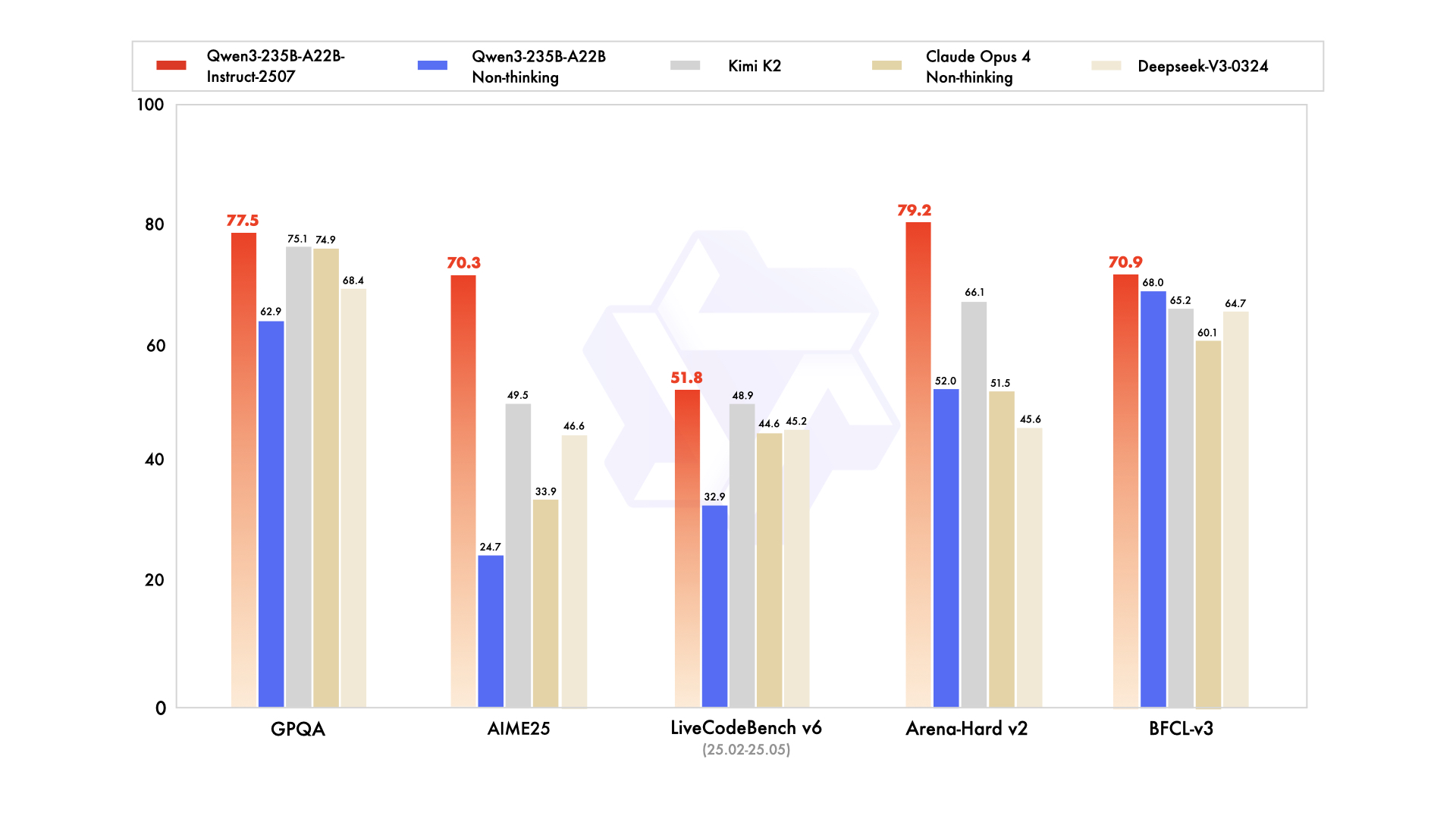
The updated versions of more Qwen3 model sizes and for thinking mode are also expected to be released very soon. Stay tuned🚀
Previous News for Qwen3 Release
We are excited to announce the release of Qwen3, the latest addition to the Qwen family of large language models.
These models represent our most advanced and intelligent systems to date, improving from our experience in building QwQ and Qwen2.5.
We are making the weights of Qwen3 available to the public, including both dense and Mixture-of-Expert (MoE) models.
The highlights from Qwen3 include:
- Dense and Mixture-of-Experts (MoE) models of various sizes, available in 0.6B, 1.7B, 4B, 8B, 14B, 32B and 30B-A3B, 235B-A22B.
- Seamless switching between thinking mode (for complex logical reasoning, math, and coding) and non-thinking mode (for efficient, general-purpose chat), ensuring optimal performance across various scenarios.
- Significantly enhancement in reasoning capabilities, surpassing previous QwQ (in thinking mode) and Qwen2.5 instruct models (in non-thinking mode) on mathematics, code generation, and commonsense logical reasoning.
- Superior human preference alignment, excelling in creative writing, role-playing, multi-turn dialogues, and instruction following, to deliver a more natural, engaging, and immersive conversational experience.
- Expertise in agent capabilities, enabling precise integration with external tools in both thinking and unthinking modes and achieving leading performance among open-source models in complex agent-based tasks.
- Support of 100+ languages and dialects with strong capabilities for multilingual instruction following and translation.
News
- 2025.07.21: We released the updated version of Qwen3-235B-A22B non-thinking mode, named Qwen3-235B-A22B-Instruct-2507, featuring significant enhancements over the previous version and supporting 256K-token long-context understanding. Check our modelcard for more details!
- 2025.04.29: We released the Qwen3 series. Check our blog for more details!
- 2024.09.19: We released the Qwen2.5 series. This time there are 3 extra model sizes: 3B, 14B, and 32B for more possibilities. Check our blog for more!
- 2024.06.06: We released the Qwen2 series. Check our blog!
- 2024.03.28: We released the first MoE model of Qwen: Qwen1.5-MoE-A2.7B! Temporarily, only HF transformers and vLLM support the model. We will soon add the support of llama.cpp, mlx-lm, etc. Check our blog for more information!
- 2024.02.05: We released the Qwen1.5 series.
Performance
Detailed evaluation results are reported in this 📑 blog.
For requirements on GPU memory and the respective throughput, see results here.
Run Qwen3
🤗 Transformers
Transformers is a library of pretrained natural language processing for inference and training.
The latest version of transformers is recommended and transformers>=4.51.0 is required.
The following contains a code snippet illustrating how to use Qwen3-235B-A22B-Instruct-2507 to generate content based on given inputs.
|
|
[!Note] The updated version of Qwen3-235B-A22B, namely Qwen3-235B-A22B-Instruct-2507 supports only non-thinking mode and does not generate
<think></think>blocks in its output. Meanwhile, specifyingenable_thinking=Falseis no longer required.
Switching Thinking/Non-thinking Modes for Previous Qwen3 Hybrid Models
By default, Qwen3 models will think before response. This could be controlled by
enable_thinking=False: Passingenable_thinking=Falseto `tokenizer.apply_chat_template` will strictly prevent the model from generating thinking content./thinkand/no_thinkinstructions: Use those words in the system or user message to signify whether Qwen3 should think. In multi-turn conversations, the latest instruction is followed.
ModelScope
We strongly advise users especially those in mainland China to use ModelScope.
ModelScope adopts a Python API similar to Transformers.
The CLI tool modelscope download can help you solve issues concerning downloading checkpoints.
llama.cpp
llama.cpp enables LLM inference with minimal setup and state-of-the-art performance on a wide range of hardware.
llama.cpp>=b5092 is required for the support of Qwen3 architecture.
llama.cpp>=b5401 is recommended for the full support of the official Qwen3 chat template.
To use the CLI, run the following in a terminal:
|
|
To use the API server, run the following in a terminal:
|
|
A simple web front end will be at http://localhost:8080 and an OpenAI-compatible API will be at http://localhost:8080/v1.
For additional guides, please refer to our documentation.
[!TIP] llama.cpp adopts “rotating context management” and infinite generation is made possible by evicting earlier tokens. It could configured by parameters and the commands above effectively disable it. For more details, please refer to our documentation.
Ollama
After installing Ollama, you can initiate the Ollama service with the following command (Ollama v0.6.6 or higher is required):
|
|
To pull a model checkpoint and run the model, use the ollama run command. You can specify a model size by adding a suffix to qwen3, such as :8b or :30b-a3b:
|
|
You can also access the Ollama service via its OpenAI-compatible API.
Please note that you need to (1) keep ollama serve running while using the API, and (2) execute ollama run qwen3:8b before utilizing this API to ensure that the model checkpoint is prepared.
The API is at http://localhost:11434/v1/ by default.
For additional details, please visit ollama.ai.
[!TIP] Ollama adopts the same “rotating context management” with llama.cpp. However, its default settings (
num_ctx2048 andnum_predict-1), suggesting infinite generation with a 2048-token context, could lead to trouble for Qwen3 models. We recommend settingnum_ctxandnum_predictproperly.
LMStudio
Qwen3 has already been supported by lmstudio.ai. You can directly use LMStudio with our GGUF files.
ExecuTorch
To export and run on ExecuTorch (iOS, Android, Mac, Linux, and more), please follow this example.
MNN
To export and run on MNN, which supports Qwen3 on mobile devices, please visit Alibaba MNN.
MLX LM
If you are running on Apple Silicon, mlx-lm also supports Qwen3 (mlx-lm>=0.24.0).
Look for models ending with MLX on Hugging Face Hub.
OpenVINO
If you are running on Intel CPU or GPU, OpenVINO toolkit supports Qwen3. You can follow this chatbot example.
Deploy Qwen3
Qwen3 is supported by multiple inference frameworks.
Here we demonstrate the usage of SGLang, vLLM and TensorRT-LLM.
You can also find Qwen3 models from various inference providers, e.g., Alibaba Cloud Model Studio.
SGLang
SGLang is a fast serving framework for large language models and vision language models.
SGLang could be used to launch a server with OpenAI-compatible API service.
sglang>=0.4.6.post1 is required.
It is as easy as
|
|
An OpenAI-compatible API will be available at http://localhost:30000/v1.
vLLM
vLLM is a high-throughput and memory-efficient inference and serving engine for LLMs.
vllm>=0.8.5 is recommended.
|
|
An OpenAI-compatible API will be available at http://localhost:8000/v1.
TensorRT-LLM
TensorRT-LLM is an open-source LLM inference engine from NVIDIA, which provides optimizations including custom attention kernels, quantization and more on NVIDIA GPUs. Qwen3 is supported in its re-architected PyTorch backend. tensorrt_llm>=0.20.0rc3 is recommended. Please refer to the README page for more details.
|
|
An OpenAI-compatible API will be available at http://localhost:8000/v1.
MindIE
For deployment on Ascend NPUs, please visit Modelers and search for Qwen3.
Build with Qwen3
Tool Use
For tool use capabilities, we recommend taking a look at Qwen-Agent, which provides a wrapper around these APIs to support tool use or function calling with MCP support. Tool use with Qwen3 can also be conducted with SGLang, vLLM, Transformers, llama.cpp, Ollama, etc. Follow guides in our documentation to see how to enable the support.
Finetuning
We advise you to use training frameworks, including Axolotl, UnSloth, Swift, Llama-Factory, etc., to finetune your models with SFT, DPO, GRPO, etc.
License Agreement
All our open-weight models are licensed under Apache 2.0. You can find the license files in the respective Hugging Face repositories.
Citation
If you find our work helpful, feel free to give us a cite.
|
|
Contact Us
If you are interested to leave a message to either our research team or product team, join our Discord or WeChat groups!
